Done wrong, though, you can end up with a noisy, overheating box and a graphics card that's been pushed to its limits. This guide will help you do it right.
Why a Second Hand Gaming Desktop Makes Sense
Gaming hardware loses value quickly. A graphics card that was top-tier three years ago often sells for far less today but still runs most games well at 1080p. That gap between original price and real-world usefulness is where the value lives.
A desktop also gives you something a laptop can't: upgradability. You can swap the graphics card, add RAM or storage, and improve airflow, all without replacing the whole machine. Many people who shop for used and refurbished laptops find that for pure gaming, a desktop delivers more speed per rupee.
Desktop or Laptop? A Quick Reality Check
If you need portability, a gaming laptop makes sense, and a refurbished i7 laptop or second hand i7 laptop with a dedicated graphics chip can be a smart, budget-friendly option. But for the same money, a desktop typically gives you:
-
Better cooling and quieter performance under load
-
More powerful graphics
-
Easy upgrades and repairs
-
Longer useful life
If you'll mostly game at one desk, a desktop wins.
The Parts That Matter Most
1. The Graphics Card (GPU)
This is the heart of a gaming PC. For 1080p gaming, look at mid-range cards from recent generations. Older GTX and RTX cards and AMD equivalents can still perform well.
Be careful with: cards that look unusually cheap. Ex-mining cards exist in the second hand market, and while many still work, they need extra scrutiny. Ask about the card's history and check for dust, fan wear and damaged connectors.
2. The Processor (CPU)
Modern games need a decent CPU to keep frame rates stable. A quality Intel i5 or i7, or a Ryzen 5 or 7 from a reasonably recent generation, is enough for most gamers. Don't pair a strong GPU with a weak CPU, or the CPU will hold everything back.
3. RAM
16 GB is the practical standard in 2026. 8 GB works for older or lighter titles but will limit you soon. Dual-channel (two sticks) performs better than a single stick.
4. Storage
Insist on an SSD for the operating system and games. A hard drive-only gaming PC means long loading screens. A 512 GB SSD is a good start, and you can add more later.
5. The Power Supply (PSU)
This is the most overlooked component, and the most dangerous to ignore. A cheap or worn-out PSU can damage other parts. Look for a branded unit with enough wattage for your GPU, and confirm it's in good working condition.
6. Cooling and Cabinet
Good airflow keeps performance steady and parts healthy. Check the fans, look for heavy dust, and ask if thermal paste has been refreshed. A tidy, clean build usually reflects a seller who cares.
What Should You Budget?
Prices change constantly depending on GPU demand, so treat this as a rough guide:
-
Entry level: capable of esports titles like Valorant, CS2 and older AAA games at 1080p.
-
Mid-range: solid 1080p performance in most modern games at medium to high settings.
-
Upper mid-range: high settings, better frame rates, and some 1440p gaming.
Check current second hand and refurbished listings, since GPU prices move quickly. When comparing, keep in mind that refurbished laptops and budget desktops are not the same category, so compare like with like: a desktop's price should include the GPU, PSU and storage.
How to Inspect a Second Hand Gaming Desktop
Whether you're buying online or in person, run through this list:
-
Check the specs match the listing. Use a free system-info tool to confirm the CPU, GPU and RAM.
-
Run a stress test. Watch temperatures. If the GPU or CPU spikes very high quickly, cooling may be poor.
-
Play an actual game for 20 to 30 minutes. Look for crashes, artifacts (odd flickering or colours), or sudden fan noise.
-
Inspect the ports and USB slots. Faulty front-panel ports are common in used cabinets.
-
Look inside. Burn marks, bulging capacitors or unusual smells are red flags.
-
Ask about warranty and returns. Even used parts should come with some form of assurance.
If you're comparing options from a seller like Lapeasy, look for refurbished laptops with warranty style protection on desktops too. Ask what's covered and for how long.
Red Flags to Avoid
-
No clear photos or specs. Vague listings usually hide problems.
-
Seller can't explain the GPU's history. A reputable seller should know where parts came from.
-
Mismatched parts. A high-end GPU with a tiny PSU or a weak CPU is a bad combination.
-
Pressure to pay quickly. Good deals don't disappear in five minutes.
-
No returns at all. Even a short testing window matters.
Custom-built vs Branded Second Hand Desktops
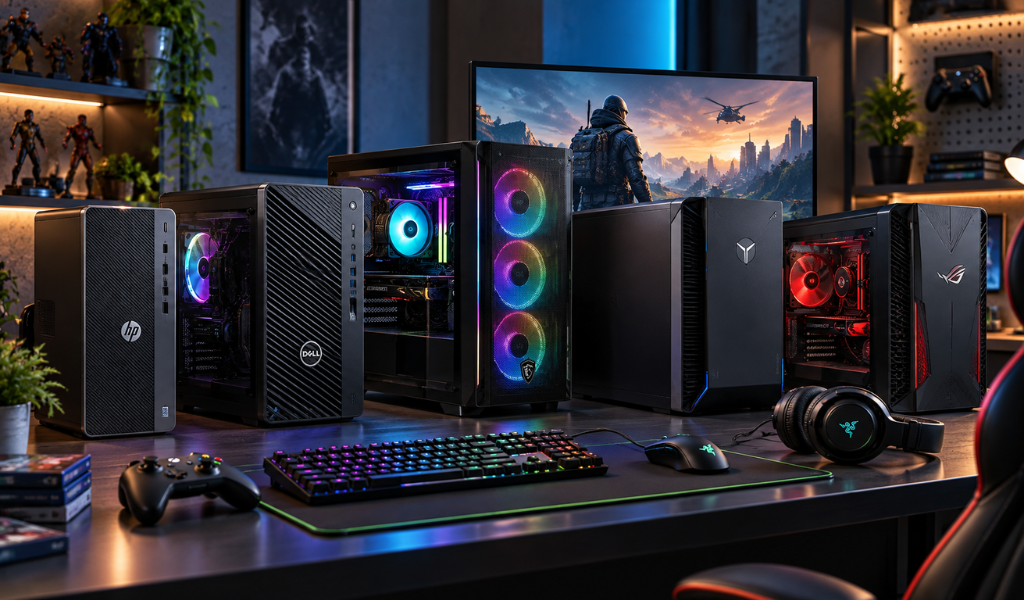
Branded desktops (from big OEMs) are usually more consistent and often have cleaner internals, but may have proprietary parts that limit upgrades.
Custom-built PCs offer better upgrade freedom and often better airflow, but quality varies hugely depending on who built them. Ask for a parts list and check that every component is a known brand.
Games You Can Expect to Run Well
With a solid mid-range GPU and 16 GB RAM, you can generally expect smooth performance in games like GTA V, Fortnite, Apex Legends, and Call of Duty at reasonable settings. For newer, heavier titles, adjust graphics settings and use upscaling tools where available.
Should You Upgrade After Buying?
Often, yes, and this is the beauty of desktops. Easy upgrades include:
-
Adding another 8 GB or 16 GB of RAM
-
Swapping in a bigger or faster SSD
-
Replacing the GPU later when prices drop
-
Adding extra case fans for better cooling
A good second hand desktop is a starting point, not a dead end.
Our Recommendation
For most budget gamers in India, the best approach is a desktop with a mid-range GPU, an i5 or Ryzen 5 processor, 16 GB RAM and an SSD. It'll handle most popular games at 1080p and leave room to grow.
If you want to game on the move, look at a second hand i7 laptop with a dedicated graphics card instead, and make sure you check thermals and battery health carefully.
Whatever you choose, buy from a seller who tests hardware, describes condition honestly, and stands behind the product. Explore Lapeasy's collection, compare specs and ask our team if you'd like help matching a machine to the games you play.
FAQ's
1. Is it safe to buy a second hand gaming desktop in India?
Yes, if you buy from a transparent seller, verify the specs, test the machine under load, and get some form of warranty or return option.
2. What's the most important part of a gaming desktop?
The graphics card matters most for frame rates, but a balanced CPU, enough RAM, an SSD and a reliable PSU are equally important for a smooth experience.
3. Are ex-mining graphics cards a bad idea?
Not always, but they need extra checking. Look at fan condition, temperatures, and ask about the card's history before buying.
4. How much RAM do I need for gaming in 2026?
16 GB is the practical standard. 8 GB works for lighter games but will limit you as games get heavier.
5. Should I buy a gaming desktop or a second hand gaming laptop?
If you'll game mostly at home, a desktop offers better performance and upgrade options for the same money. Choose a laptop, such as a refurbished i7 laptop with dedicated graphics, if you need portability.